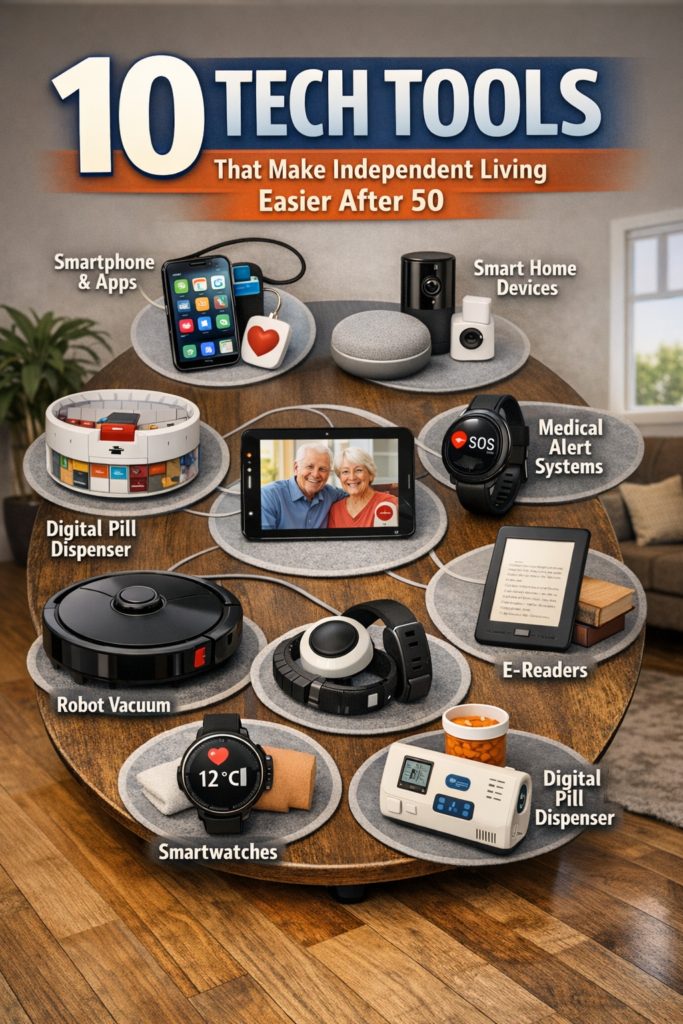
The AgeTech Guide: Technology for Aging Well


Smart Devices and Apps to Stay Independent, Safe, and Connected

Looking for the best AgeTech devices and solutions to help you or a loved one age well at home in 2026? You’re in the right place. This complete AgeTech guide covers everything you need to know about technology for seniors—from smart home devices and health monitoring systems to safety alerts and telehealth apps. As the senior technology market grows, more families are discovering how AgeTech solutions enable older adults to maintain independence, improve quality of life, and age in place safely. Whether you need fall detection sensors, medication management apps, GPS trackers for dementia patients, or voice-activated assistants, we’ll show you the top-rated products and proven strategies that work. In this guide, you’ll learn which AgeTech devices offer the best value and how to set them up for seniors with limited tech experience. Plus, get expert recommendations on creating a complete smart home ecosystem tailored for aging adults. Ready to find the perfect technology to support independent living? Let’s get started.
[Add main content]
Today, 89% of older adults say aging in place is essential to them, and more families than ever are asking how technology can enable it safely and with dignity. AgeTech platforms like 50PlusTechBridge.com are building a new ecosystem of aging-in-place technology that supports daily life, connection, and confidence at home. This guide walks you through the key ideas, tools, and community resources that can help you or your loved ones live independently for longer—without needing to “go it alone.”
[Section heading]

[Section heading]
What is AgeTech?
What is 50PlusTechBridge.com? 50PlusTechBridge.com acts as a community and bridge between senior technology solutions and the people who need them, highlighting tools, education, and AgeTech resources tailored to adults 50+.
Do older adults really use advanced tech? Yes. Many older adults already own smartphones, tablets, and smart-home devices, and platforms like Learn More Technologies show how digital skills can be built step by step.
Is AgeTech only about health? No. While safety is essential, AgeTech also supports learning, social connection, digital organization, and everyday life tasks—areas covered in resources such as the Digital Skills Foundations.
Where can I start if I’m new to tech? Begin with simple guides that position your phone as your “Window to the World” and explain how to get the most from it. Then layer in AgeTech tools that align with your goals.
1. What Is AgeTech and Why Is It So Important for Aging in Place?
AgeTech refers to technologies designed specifically for older adults, caregivers, and aging communities. Instead of asking people to fit into complex tools, good AgeTech listens first: “What do you want your daily life to look like?” and then builds senior technology solutions that fit around real needs.
From assistive technology to support mobility in older adults to simple apps that make video calls easier, AgeTech focuses on dignity, choice, and control. When combined with education and community support, it creates a realistic path for aging in place that feels empowering rather than overwhelming.

Key Areas AgeTech Supports
- Daily living: reminders, organization, and simple interfaces for everyday tasks.
- Safety and mobility: tools that help manage fall risks and monitor the home.
- Connection: simplified video calls, messaging, and shared family apps.
- Learning and work: courses and tools that keep skills current and confidence high.
AgeTech as Community Infrastructure
Think of AgeTech as part of your local infrastructure, like ramps and good lighting. When supported by training and a welcoming community, technologies become less about gadgets and more about everyday independence. That is where platforms like SecureStep.ai and 50PlusTechBridge.com begin to play a decisive role.
2. Aging in Place: The Vision, the Challenges, and the Role of Technology
Aging in place means continuing to live in your own home and community, with the support you choose, for as long as it makes sense for you. Many older adults prefer familiar spaces, neighbors, and routines, and families value the continuity this brings.
Yet aging in place is not just about “staying put.” It requires thoughtful planning around home safety, mobility, communication, and digital access. Here is where aging-in-place technology bridges the gap between what older adults want and what families and communities can realistically provide.

Typical Aging-in-Place Needs Technology Can Support
- Home awareness: knowing doors, lights, and appliances are as expected.
- Mobility and stability: understanding walking patterns and changes over time.
- Communication: easy ways to check in with family, neighbors, and care teams.
- Digital tasks: paying bills, booking services, and accessing community resources online.
Why Simplicity Matters
Adults 50+ are using technology more than ever, but designs still need to respect different comfort levels. Simple interfaces, clear fonts, and step-by-step guidance go a long way. Communities that combine tools with training—online and in person—experience the most tremendous success in long-term adoption.
3. How AI Helps Without Becoming Overbearing
- Pattern awareness: noticing when movement slows, becomes uneven, or changes time of day.
- Home context: focus on stairs, entries, and common pathways where extra caution is needed.
- Family coordination: sharing meaningful alerts without flooding caregivers with notifications.
Did You Know?
AI usage among adults 50+ rose to about 30% in 2025, up from 18% in 2024—showing that older adults are increasingly open to AI-enabled tools like SecureStep.ai in their daily lives.
50PlusTechBridge.com: Connecting Older Adults to Practical Tech Solutions
Learnmoretecnolofies.com, an online community, and 50PlusTechBridge.com represent a crucial piece of the puzzle: connection. Many older adults and caregivers recognize they need better tools but are unsure where to start or whom to trust. A bridge platform brings people, products, and training into one conversation.
Instead of only concentrating on devices, the 50PlusTechBridge.com community focuses on real-life situations. Questions like: “How can we simplify staying in touch with family?” and “How can I earn extra income online?” “What does a smart home for seniors actually look like in practice?” is central to our approach. This community-centered method builds confidence and empowers older adults to take control of their technology experiences.
4. How the 50Plus Tech Bridge community Supports Aging in Place
- Curated solutions: highlighting tools that work well for older adults, not just the newest releases.
- Education pathways: point users to training, such as digital skills courses, to make adoption easier.
- Community voices: capturing feedback from older adults, caregivers, and professionals.
From Confusion to Clear Next Steps

With so many devices and apps on the market, it is easy to feel overwhelmed. 50PlusTechBridge.com resources help families move from “Where do we even begin?” to a short, clear list: a communication tool, and a foundation for a digital skills training program that keeps everyone comfortable and confident.
5. Building a Smart Home for Seniors: Practical AgeTech Ideas
A smart home for seniors does not need to be complicated or expensive. In most cases, it’s about combining a few well-chosen tools that work together to support daily routines, rather than filling the house with gadgets.
Because 49% of older adults already own at least one smart home device, families often have a head start. The next step is to align these devices with aging goals: safety, comfort, and ease of communication.
Core Elements of a Senior-Friendly Smart Home
- Lighting: voice- or motion-activated lights in hallways, bathrooms, and entries.
- Door and window alerts: gentle notifications for unusual activity.
- Voice assistants: simple voice commands for calls, reminders, and information.
- Mobility-aware tools: systems like SecureStep.ai that add awareness without pressure.
Balancing Automation and Control
For many older adults, choice matters as much as convenience. The best setups enable automatic safety features (e.g., lights that turn on) while still giving residents complete control. It helps to introduce one feature at a time, with clear practice sessions, so confidence grows naturally.

6. Digital Skills as the Foundation of Any AgeTech Plan
No matter how advanced age tech becomes, it only helps when people feel comfortable using it. That is why digital skills programs tailored for older adults are such a critical part of any AgeTech and aging-in-place strategy.
Resources such as the Foundation Digital Skills lesson and the broader essential digital skills content demonstrate how structured learning can meet older adults where they are—patiently, practically, and with real-world examples.
Why Digital Skills Matter for Aging in Place
- Confidence: knowing how to use phones, tablets, and computers without fear.
- Access: reaching online services, information, and AgeTech tools.
- Independence: handling everyday digital tasks without always needing help.
“Your Cell Phone – Window to the World” Approach
Guides like Your Cell Phone – Window to the World frame the smartphone as a helpful tool rather than a barrier. This kind of framing helps older adults view technology as an option that expands their choices—staying in touch, joining classes, and managing appointments—rather than as something imposed on them.
Did You Know?
71% of adults 50+ purchased technology in 2025, with an average spending of around $756, indicating that older adults are already investing in tools that support aging in place.
7. The Role of Community Platforms Like Learn More Technologies
Community-focused platforms, such as Learn More Technologies’ News Feed, demonstrate how ongoing communication and learning support AgeTech adoption. They keep older adults and their families informed about new tools, success stories, and digital skill-building opportunities.
Rather than a one-time training, this kind of news and community activity creates a living hub where questions are welcomed and new solutions can be explored together. That approach aligns with the mission of 50PlusTechBridge.com and similar initiatives.
How Community Platforms Strengthen Aging in Place Plans
- Regular updates about new AgeTech tools and practical tips.
- Shared stories from peers who are learning and experimenting with tech.
- Links to courses and resources that deepen digital comfort.
From Learning to Leadership
Many older adults who begin as learners eventually become informal leaders, sharing their experiences with others. Community platforms help capture and amplify those voices, which is essential for building AgeTech solutions that feel realistic, respectful, and responsive.
8. Designing Senior Technology Solutions That Older Adults Actually Want

For AgeTech, success is not only about innovation; it’s about usability. About 60% of older adults say technology often feels as if it is not designed for their age. To change this, solution designers have to listen closely to lived experience.
Effective technology for older adults assumes diverse abilities, preferences, and daily routines. It also includes families and caregivers as partners, not just as “tech support.” Platforms like 50PlusTechBridge.com and Learn More Technologies embody this by inviting constant feedback and dialogue.
Checklist for Senior-Friendly Tech Design
- Clear language instead of jargon and complex menus.
- Adjustable text sizes, contrast, and audio support.
- Simple setup with step-by-step guides or companion training.
- Respect for privacy with straightforward explanations about what is monitored and why.
From Devices to Experiences
Older adults are not just buying devices; they are investing in experiences—staying at home, keeping routines, and participating in family life. When we design with that in mind, AgeTech feels less like “tech” and more like a natural part of everyday living.
9. Supporting Caregivers with AgeTech and Community Resources
There are an estimated 63 million caregivers in the US, many juggling work, family, and care responsibilities. AgeTech can ease coordination and communication, but only if caregivers are included in the planning and training from the start.
Platforms like SecureStep.ai can help caregivers feel more informed about daily patterns at home, while community resources such as Learn More Technologies and 50PlusTechBridge-style hubs provide practical guides and peer insight. Together, they create a support network around the older adult, rather than placing all pressure on a single person.
Ways AgeTech Supports Caregivers
- Shared dashboards or apps that provide simple status updates.
- Communication tools that streamline group coordination.
- Educational content about digital tools and respectful support.
Caregivers as Partners in Design
Caregivers often see day-to-day realities that tech designers and policymakers miss. Including them in feedback loops—through platforms like 50PlusTechBridge.com and community forums—leads to solutions that genuinely reduce complexity rather than add it.

10. Planning Your Personal AgeTech and Aging-in-Place Roadmap
Aging in place with AgeTech does not require doing everything at once. A simple, phased roadmap can keep things manageable and give everyone time to adjust and learn.
Use the steps below as a starting framework, then adapt them to your home, family, and community. Remember that your plan can evolve as needs and comfort with technology grow.
Sample Aging-in-Place Technology Roadmap
- Join the 50plustechbridge.com community.
- Clarify goals: What does a “good day at home” look like now and in five years?
- Assess digital comfort: Use resources like Learn More Technologies to identify learning needs.
- Start with communication: Ensure phones, messaging, and video calls are easy to use.
- Add safety layers: Consider smart lighting, door alerts, and mobility tools like SecureStep.ai.
- Review annually: Revisit what’s working, what feels confusing, and what needs adjusting.
Comparing Focus Areas
| Focus Area | Main Goal | Example Tools / Platforms |
|---|---|---|
| Digital Skills | Confidence using everyday tech | Learn More Technologies courses and lessons |
| Home Safety & Mobility | Safer movement and awareness at home | SecureStep.ai and simple smart-home devices |
| Community & Connections | Support, shared learning, and feedback | 50PlusTechBridge.com-style hubs and news feeds |
Conclusion
AgeTech is about more than devices; it is about shaping communities where older adults can age in place with confidence, choice, and strong connections. SecureStep.ai, 50PlusTechBridge.com, and learning platforms such as Learn More Technologies show how safety, skills, and community can come together to support that vision.

Whether you are an older adult, a family member, or a community leader, you do not have to tackle this alone. Start with one step—building core digital skills, exploring a simple smart home feature for seniors, or joining a community conversation—and let your AgeTech plan grow at your own pace. With the right mix of senior technology solutions, education, and support, living well at home for longer becomes a realistic, shared goal.
Smart Home, Good Food, Spiritual Practice, Family, Great company, and Exercise and Social engagement.

[Section Heading]